

ViaPrint 4.0.0033
It is label printing software useful when printing many labels
Program info
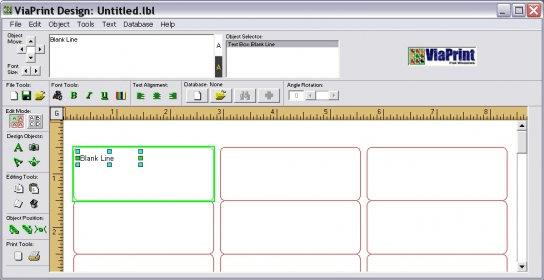
ViaPrint is an easy-to use label printing program which allows you to simplify your work and save your time when printing labels. Thanks to its Page Design Wizard you can configure the number of labels, their size, and the paper size with few steps. You can edit a single label and the information will be applied to the rest of the labels on the page or you can print labels with different information on each label. Besides inserting text on labels you can add images (graphic formats supported: bmp, jpg, gif, and wmf). Each object inserted is individual, so it can be copied, moved, or modified independently. If you insert a textbox, you have to type the text on the frame situated at the left of the 'Object Selector' frame. You can select an object by clicking on it or by using the 'Object Selector' on the top of the main window. Also you can change the objects' position with the 'Object Move' tool, send objects back or front or increase/decrease the font with the 'Font Size' tool. You can use the 'Set Transparent' feature to show objects behind an image. You can insert rounded text at the top or the bottom of circle objects, and mix the text format in the same text box. Other important feature is the 'Use Text Entry Delay' which allows you to type the text before it is updated on the screen. If you are editing labels individually you can duplicate the design of a selected label into others. Additional features: you can use the metric system instead of inches, and you can use the ViaBase feature for importing information from databases for creating the labels.
Pros
- You can edit a single label and the information will be copied to the rest of the labels on the page or you can print labels with different information on each label
- You can import information from databases for creating the labels
Cons
- The trial version adds a watermark on each label printed
Details
Extensions

No information available
The data will be available later.Old versions

No information available
The data will be available later.Awards

Related software

Graphics editing tool to create disc labels.

This is a program that allows you to create mail and address labels.

It is a program designed for printing business cards, envelopes and labels.
Related stories
See all
Microsoft just launched a new service called Stream, that offers a secure way for business to share videos internally.
Updated to Windows 10 and can't use your optical drive? There are several solutions to this issue. Check them out in this article.
Microsoft has released a new Insider build for its Windows 11 operating system, which introduces the ability to extract audio tracks from audio CDs.


Comments